
THE BIG IDEA
The next wave of AI agents will not be judged by how impressive the demo looks.
It will be judged by where the agent is allowed to operate.
That sounds technical, but it is really an operating question. If an AI agent can only act inside a tightly controlled sandbox, it may be useful for experiments, drafts, and isolated tasks. But the moment you want it to affect real business outcomes, it needs access to real systems, real context, and real workflows.
That is where the danger starts.
An agent that can create accounts, buy domains, deploy code, move data, update records, contact customers, or trigger workflows is no longer a fancy chatbot. It is a semi-independent worker operating inside your business.
And semi-independent workers need more than prompts.
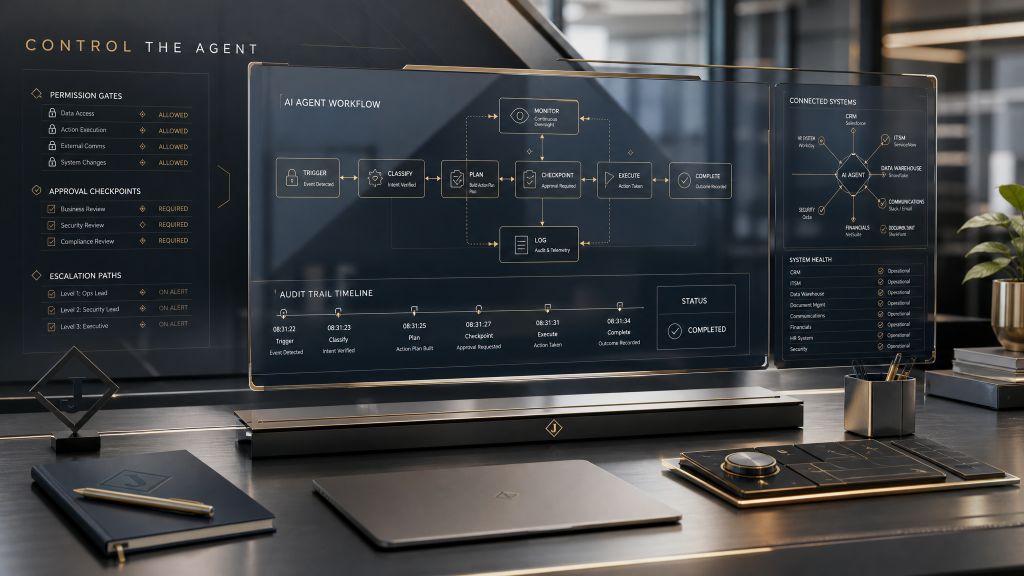
They need boundaries, permissions, review paths, escalation rules, logs, and someone clearly responsible for the outcome.
The companies that understand this will turn agents into leverage. The companies that do not will turn agents into a new class of operational risk.
THE PROOF POINT
This week’s signal is simple: agent capability is moving closer to real operations.
Cloudflare has been showing how agents can create accounts, purchase domains, and deploy applications. Hacker News has been debating where the “agent harness” belongs and how much of the agent’s operating environment should live inside or outside the sandbox.
That may sound like developer chatter, but founders and operators should pay attention.
The important part is not whether this specific tool becomes standard.
The important part is the direction of travel.
AI is moving from “help me think” to “go do the thing.”
That shift changes the management problem.
When AI helps write an email, the risk is mostly quality. Is the message clear? Is it accurate? Does it sound right?
When AI sends the email, updates the CRM, changes the website, books the meeting, deploys the code, or charges the card, the risk becomes operational. Did it act in the right system? With the right authority? Under the right conditions? With the right audit trail?
That is a different game.
WHY THIS MATTERS TO YOU
Most small businesses and founder-led teams are not ready for autonomous agents because their processes are not ready.
That is not an insult. It is just the truth.
A lot of business operations still run on tribal knowledge, Slack messages, inbox memory, “ask Sarah,” and a dozen undocumented exceptions. That can work when humans are manually carrying the context.
It breaks when you ask an agent to act.
Agents do not magically understand your business judgment. They execute against the system you give them. If that system is vague, fragile, or full of hidden rules, the agent will either stall out or scale the confusion.
This is why “we need AI” is often the wrong starting point.
The better starting point is:
- What decisions are repeatable?
- What actions are safe to automate?
- What requires human approval?
- What systems can the agent touch?
- What should the agent never touch?
- What happens when the agent is uncertain?
That is not prompt engineering. That is operating design.
And it is where the real value is going to be.
THE OPERATIONAL TAKEAWAY: THE AGENT BOUNDARY MAP
Before you put an AI agent into a real workflow, map its boundaries.
Use four categories.
1. Observe
What can the agent read?
This includes documents, CRM records, emails, calendars, analytics, files, tickets, forms, and databases.
Be careful here. Read access still matters. An agent that can see sensitive client data, financial details, internal notes, or private strategy needs rules around what it can use and where that information can appear.
2. Recommend
What can the agent suggest, but not execute?
This is the safest early zone for most businesses. Let the agent draft the response, flag the issue, prepare the proposal, summarize the account, or recommend the next step.
A human still approves the move.
3. Act
What can the agent do without approval?
Keep this list short at first. Good candidates are low-risk, reversible, and easy to audit. Tagging a record. Creating a draft. Adding a task. Routing a form submission. Preparing a folder. Updating an internal checklist.
Do not start with irreversible actions.
4. Escalate
When must the agent stop and ask for help?
This is the category most teams skip. They design for the happy path and forget that real operations are mostly exceptions.
Escalation rules should be clear:
- If money moves, escalate.
- If a customer-facing message is sensitive, escalate.
- If private data is involved, escalate.
- If the agent confidence is low, escalate.
- If the action cannot be reversed, escalate.
- If the request falls outside the written process, escalate.
That one map can prevent a lot of expensive nonsense.
THE REAL LESSON
The agent is not the operating system.
The agent runs inside the operating system you already have.
If your workflow is clear, owned, measured, and documented, the agent can create leverage. It can reduce manual work, shorten response time, and make the business more consistent.
If your workflow is vague, political, undocumented, or full of hidden exceptions, the agent will expose that too.
That is why AI adoption is not just a technology decision. It is a leadership decision.
Someone has to decide what good judgment looks like before the agent can imitate it.
Someone has to define the boundaries before the agent crosses them.
Someone has to own the outcome.
That someone cannot be the software.
TODAY’S ACTION
Pick one workflow where you are tempted to use an AI agent.
Before you automate anything, write four lists:
- What the agent can observe
- What the agent can recommend
- What the agent can act on
- What the agent must escalate
If you cannot fill those lists out clearly, you are not ready for the agent yet.
You are ready to fix the workflow.
That may feel slower.
It is not.
It is how you keep speed from turning into chaos.
WORTH EXPLORING
- Cloudflare’s recent work showing agents taking infrastructure actions like creating accounts, buying domains, and deploying applications.
- Current developer debates around where agent harnesses should live and how much autonomy should exist outside a sandbox.
- Your own internal workflows where AI is already being used without clear permission or escalation rules.